> For the complete documentation index, see [llms.txt](https://docs.unifize.com/llms.txt). Markdown versions of documentation pages are available by appending `.md` to page URLs; this page is available as [Markdown](https://docs.unifize.com/user-guide/my-inbox/conversation-notification.md).
# Conversation Notification
**Feature ID**: FU-10117
**Document Version:** 2.0
**Date:** 24-11-2025
### Introduction
Every record has a Conversation window, and each Conversation has a set of **Conversation Notifications**, which are updates on all activity within that record. Conversation Notifications are triggered by events such as Checklist field edit, metadata changes, workflow actions, etc, and are delivered in real time.
Each entry is timestamped and author-attributed to maintain a reliable audit trail, which by default is collapsed and grouped by a sticky date separator.
***
### Feature functionalities
* Conversation notifications capture all key activity happening within a record: checklist field updates, metadata changes (status, owner/assignee, participants, dates, priority), and conversation events (messages, Conversation created, revision created).
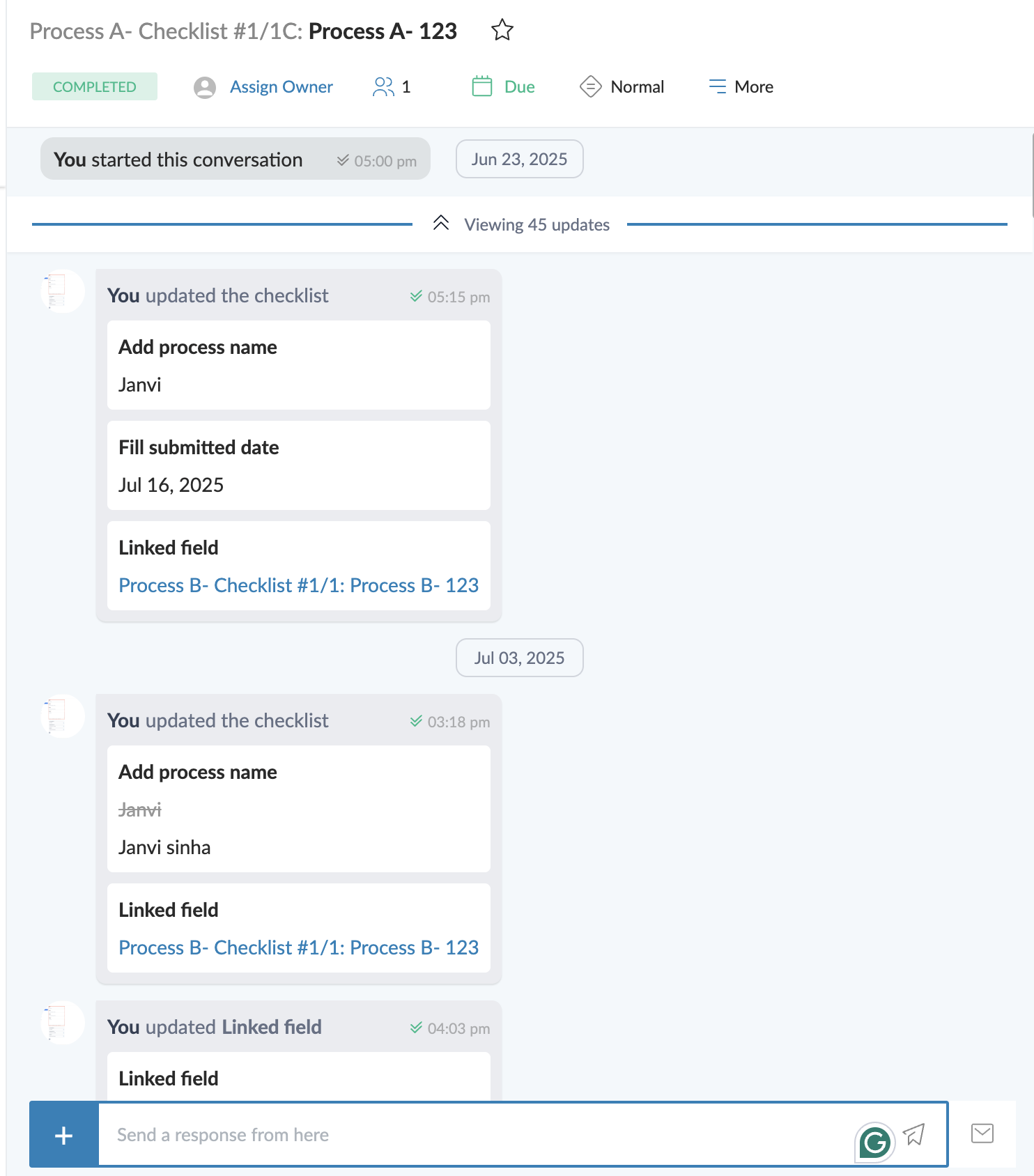
* Each notification shows the author and is timestamped. Value changes display old → new (deletes are struck through).
* Audit-trail notifications are collapsed by default to reduce noise and can be expanded whenever needed.
* Approvals are always expanded and show status, approver, ID, and comment.
* Messages never collapse and appear inline between notifications.
* Updates are grouped by date with a sticky separator while that date’s updates are in view.
* Use the date separator’s control to expand/collapse all audit-trail rows for the current Conversation. The same action is available from More → Expand notifications.
* Expanding/collapsing changes only your view; it does not affect other users.
* Use More → Filter → Conversations to show/hide Messages, Checklist updates, Metadata updates, Deleted, and Hidden entries.
* UI is black-and-white, tabular, optimized for quick scanning.
***
### User journey
This is how end users interact with Conversation Notifications.
* When you open a record, you will be able to see the Conversation with regular **messages** plus **audit-trail notifications** (checklist updates and metadata changes) grouped by **date**.
* Messages are **always open**. **Approval cards** are **always expanded** (status badge, approver, ID, signature, and optional comment). All other audit entries arrive **collapsed**.
* Users can expand/collapse **all** audit rows in that Conversation by clicking the **date separator** or going to **More → Expand notifications**. While a section is in view, the separator stays sticky, and date chips fade as they scroll past.
* Checklist updates show clear **old → new** values; file changes show file cards (removed files are struck through); form updates are grouped under the form name.
* Metadata updates (status, owner/assignee, participants, dates, priority, title/description, linked records, etc.) appear as one-line summaries with **author + timestamp** and **old → new** values.
* Users may see **prompts** asking them to complete a specific checklist field (based on your rules). They can act or **dismiss**; once dismissed, that prompt won’t reappear for that user for that rule.
* **Auto-reminders** you configure show up as lightweight cards after the time window you set.
* To focus their view, point users to **More → Filter,** where they can show/hide **Messages, Checklist updates, Metadata updates, Deleted, Hidden** or filter by **User**. Filters affect only their own view for that record.
Audit Trail expanded state
### Conversation Notifications triggers and UI
| Notification type | Notification trigger | How it appears in the Conversation | Default state |
| ------------------------------------- | --------------------------------------------------------------------------------------------------------------------------------------------------------------------------------------------------- | -------------------------------------------------------------------------------------------------------------------------------------------------------------------------------------------------------------------- | ------------------------------ |
| **Conversation created** | New Conversation is initiated | Notification saying “x (user) started this conversation.” | Collapsed |
| **Message** | User posts a message in the Conversation | Message card inline with timestamp and author | Forever Expanded |
| **Checklist updates** | Value added / edited / cleared | Prior content struck through + updated content | Collapsed |
| **File Upload Checklist** | File uploaded / updated |
| Collapsed |
| **Checklist File removed or deleted** | File deleted or removed from checklist |
If deleted: “x (user) deleted a file If removed from checklist: Strikethrough of removed file
| Collapsed |
| **AI Checklist** | AI checklist field button clicked | AI suggestions shown + “Add to Checklist” button | Collapsed |
| **Approval Checklist** | Request / Approve / Reject / Cancel | Approval card: status badge, approval ID, approver name, signature (on approve), optional comment | **Expanded (non-collapsible)** |
| **Metadata updates** | Status/Stage change, Owner/Assignee change, Participants add/remove, Date set/cleared, Priority set/updated, Title/Description edits, Linked record add/remove, and other conversation-level fields | Single collapsed row with author + timestamp and a short summary (e.g., “Status changed: Old → New”, “Assigned \ as owner”), following the same pattern: **old → new**, deletions shown with **strikethrough** | Collapsed |
### Best practices
* Start with expanded items. Read **messages** and **approval cards** first, then expand audit rows when deeper context is needed.
* Use **Filter** to focus reviews (e.g., hide Messages to scan **Checklist**/**Metadata** only, or filter by a specific user).
* Rely on the visual cues for viewing previous and current updates. Older data are **struck through** with the new data beside it.
* Don’t dismiss a **prompt** until the action is complete. It’s best to only dismiss it once your field is filled and the task is completed.
### Feature Limitations
1. **Approvals cannot be collapsed:** Approval and rejection notifications are intentionally non-collapsible to preserve audit visibility.
2. **Global audit trail expansion:** Audit trail expansion is global for the chatroom and cannot be applied on a per-date or per-notification basis.
---
# Agent Instructions
This documentation is published with GitBook. GitBook is the documentation platform designed so that both humans and AI agents can read, navigate, and reason over technical content effectively. Learn more at gitbook.com.
## Querying This Documentation
If you need additional information that is not directly available in this page, you can query the documentation dynamically by asking a question.
Perform an HTTP GET request on the current page URL with the `ask` query parameter, and the optional `goal` query parameter:
```
GET https://docs.unifize.com/user-guide/my-inbox/conversation-notification.md?ask=&goal=
```
`ask` is the immediate question: it should be specific, self-contained, and written in natural language.
`goal` is optional and describes the broader end goal you are ultimately trying to accomplish on behalf of the user. GitBook uses it to tailor the answer towards what is most useful for that goal.
The response will contain a direct answer to the question and relevant excerpts and sources from the documentation.
Use this mechanism when the answer is not explicitly present in the current page, you need clarification or additional context, or you want to retrieve related documentation sections.